Appearance
Repository
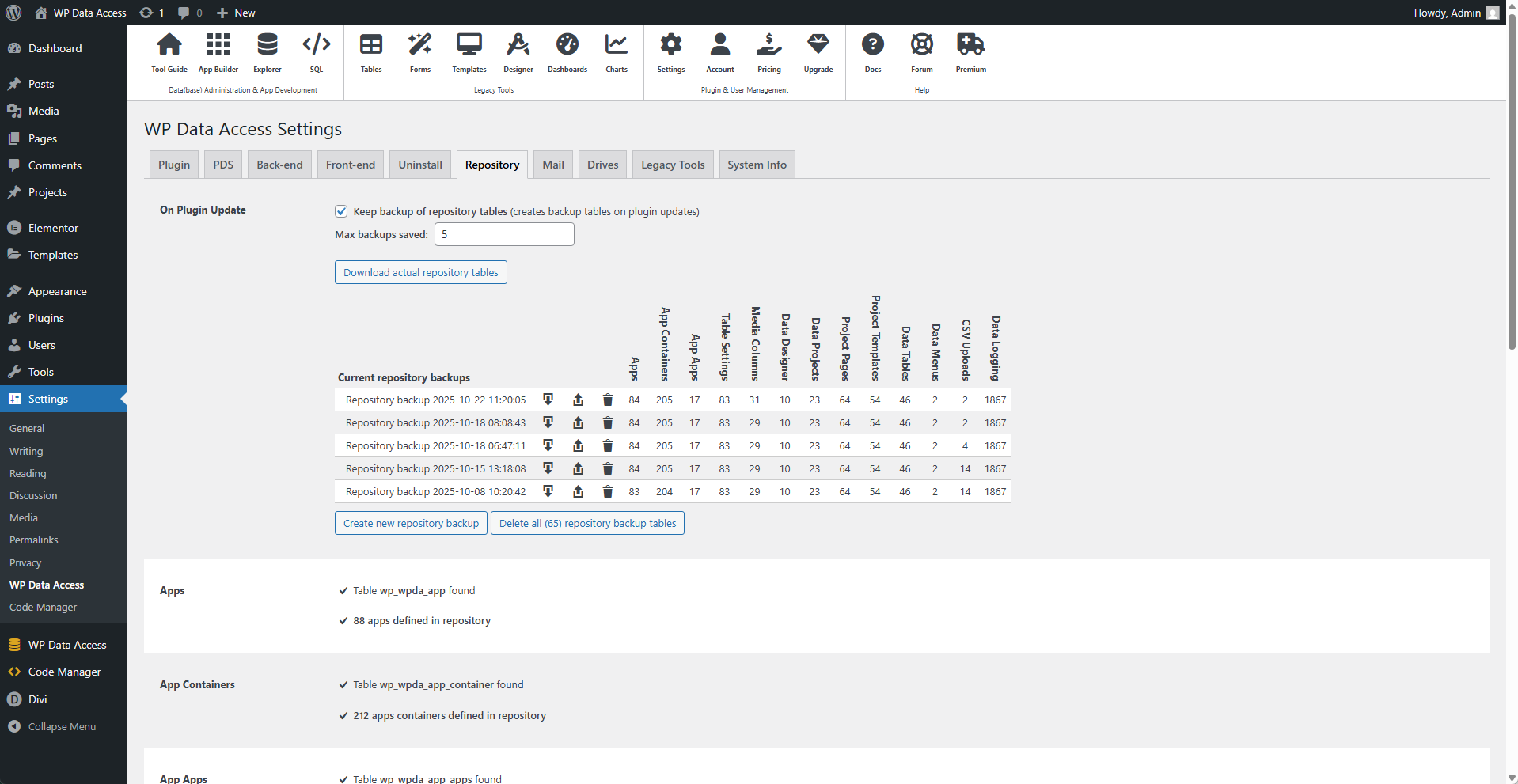
⚙️ Keep Backup of Repository Tables
Enable to backup repository tables on plugin updates.
📌 Does not create backup tables if disabled!
⚙️ Max Backups Saved
The maximum number of backups saved. If the number of backups goes over this value, the oldest backup file will be deleted.
⚙️ Download Actual Repository Tables
Downloads an export of all repository tables. Repository tables are written to a SQL script file and can be imported using the Data Explorer or an external import tool.
⚙️ Current Repository Backups
- Use the download icon to download a specific repository backup.
- Use the restore icon to restore a specific repository backup.
- Use the delete icon to delete a specific repository backup.
📌 Pressing the restore icon opens a form where tables to be restored can be selected.
⚙️ Create New Repository Backup
Creates a new backup.
📌 Immediately available in the current repository backups overview.
⚙️ Delete All (n) Repository Backup Tables
Drops all repository backup tables. This action cannot be undone! ⚠️
📌 Download your last version before you press this button.